
TeraBox Link Not Working? Quick Fix to Download Files Instantly (2026)

Ultimate Fix for TeraBox Link Not Working (2026)

TeraBox link not working is a common issue where the link opens but the file doesn’t load or download. This usually happens due to wrong link format, expired link, or browser restrictions.The solutions below will help you fix the link and download your file properly.

Most failures happen because the shared URL uses an old domain or the link was copied with extra characters. “If your terabox link not working, the fastest fix is changing teraboxapp.com to terabox.com.” then paste the corrected URL into the TeraBox Downloader tool on our homepage to download your file or video instantly.

TeraBox Link Not Working: Quick Fix Guide

Follow these steps to fix your TeraBox link and download the file without errors. This works when the link doesn’t open or download properly.

  • Copy the share link.
  • In any text editor, change teraboxapp.com to terabox.com.
  • Copy the corrected URL.
  • Open terabox-download.com and paste it into our TeraBox Downloader tool.
  • Click Download and save your file or video.

This quick swap removes the redirects and blank pages that cause “link not working,” “green button not responding,” and “video download failed” errors.
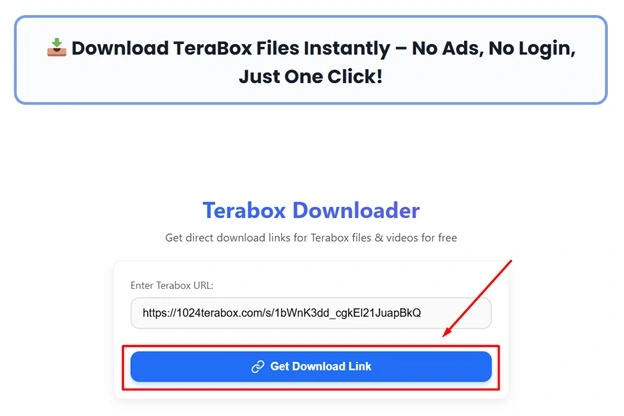
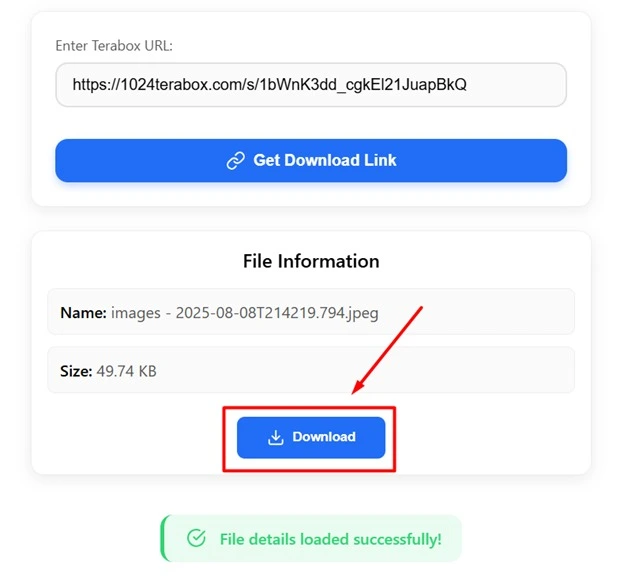
TeraBox link not working fix guide

Why TeraBox Link Not Working (Fix Reasons)

This problem usually happens when the link opens on the wrong domain, the link has expired, or the browser blocks it. Fixing the link or opening it in Chrome solves it in most cases.

  • Domain mismatch: Older links use teraboxapp.com, which triggers redirects or blocked pages on some devices and networks.
  • Messy copy: Messenger apps sometimes copy partial URLs or add invisible spaces/line breaks.
  • Tracking junk: Links with extra parameters can break. Clean it to the core format: https://www.terabox.com/s/XXXXXXXX.
  • Private/expired shares: If the owner limited access or removed the file, no downloader can bypass that. You’ll need a fresh link.
  • In-app browsers: Some apps open links inside their own mini-browser that blocks downloads.

Desktop & Mobile Steps to Fix Links

Follow these steps on Windows or Mac:

  • Copy your TeraBox link from the source.
  • Paste it into Notepad/TextEdit.
  • Replace teraboxapp.com with terabox.com (keep everything else the same).
  • Clean the URL: remove extra spaces or new lines; if a password exists, keep it separately.
  • Open terabox-download.com.
  • Paste the corrected URL into our TeraBox Downloader tool and click Download.
  • Save the file/video where you want.

Tip: If your browser blocked the download, allow the download in the top bar or choose Keep (Chrome).

Mobile Steps: Correct the Link & Download

On Android or iOS:

  • Long-press the share link → Copy.
  • Notes app → paste the link.
  • Replace teraboxapp.com with terabox.com.
  • Copy the cleaned URL.
  • Open Chrome or Edge (avoid in-app browsers).
  • Visit terabox-download.com and paste into the TeraBox Downloader tool → Download.
  • If you see “No response,” clear Chrome cache (Last 24 hours) and try again.

“Want to know which is faster? Check our APK vs Downloader comparison before downloading large files.”

TeraBox Downloader Troubleshooting

Copy Link not working

  • Don’t trust the in-app “Copy link” button if it returns a short or broken URL.
  • Manually select the entire address bar, copy it, and clean it in Notes (remove extra spaces).
  • Ensure it looks like: https://www.terabox.com/s/XXXXXXXX (add the password separately if given).
  • Paste into our downloader and proceed.

“For more information on TeraBox’s features and official announcements, visit the Official TeraBox Site.”

“If your video opens but won’t play, try using our TeraBox Online Player guide to stream files directly.”

Green download button does nothing

  • That’s usually a page-script glitch or a redirect loop.
  • Skip the button entirely: copy the URL, switch to terabox.com, and paste into the TeraBox Downloader tool on our homepage.

Video download failed

  • Clean the URL, switch to terabox.com, and try again in a real browser (Chrome/Edge).
  • If it still fails, the link might be private or expired. Ask the owner to reshare.

App keeps opening instead of browser

  • That’s a deep-link. Copy the URL, clean it, then paste into Chrome manually.
  • On Android, you can long-press the link and choose Open in Chrome when available.

Domain Variations That Work in 2026

Use these in this order of reliability:

  • ✅ terabox.com (recommended)
  • ✅ www.terabox.com
  • ⚠️ m.terabox.com (mobile view; sometimes unstable)
  • ❌ teraboxapp.com (often causes the issue you’re facing)

If your TeraBox link not working even after the domain fix, it’s almost always an availability problem on the file owner’s side.

Safe Download Practices & Legal Use

Our tool is for legal, permitted use only. your files or links that are publicly shared with permission. Do not download or republish copyrighted content without the owner’s consent. Using clean, correct URLs also reduces false security warnings and improves success rates.

If your TeraBox link is not working, always check the link format, open it in Chrome browser, and make sure the link is still active. Using the correct domain and a proper downloader tool helps open and download files without problems.

FAQs — TeraBox Link Not Working

No. If the owner removed or expired it, only they can share a new link.

Use Chrome, clear cache, and ensure the link is correct. Disable VPN if needed.

Manual copy → Clean in Notes → Remove unnecessary parameters → Paste into downloader.

Final Checklist: Paste, Fix, Download

  • Copy your link and clean it (no spaces/extra parameters).
  • Switch teraboxapp.com → terabox.com.
  • Open terabox-download.com, paste into the TeraBox Downloader tool, and click Download.
  • Still stuck? Contact us and we’ll help troubleshoot.

This simple method solves 99% of TeraBox link issues and ensures safe, instant downloads.

“Still experiencing delays? Follow our step-by-step guide to Fix Slow Download Speed for faster results.”